
GEPCO Bill Payment | Safe Ways to Pay Your GEPCO Bills
Do you still visit bank branches to pay your GEPCO Bills? You need to pay your bill each month to ensure uninterrupted electricity service. But most people still live in the 20th century and believe in paying bills only at bank branches. In this guide, we will introduce you to traditional and modern bill payment methods, including mobile banking apps, mobile wallets, and more.
After reading this article, you will know a lot of payment methods that will ease your life. By adopting modern ways for bill payment, you can enjoy bill payment instantly without waiting in long queues. It will ease your bill payment procedure. Let’s discuss different ways, their authority, and safety.
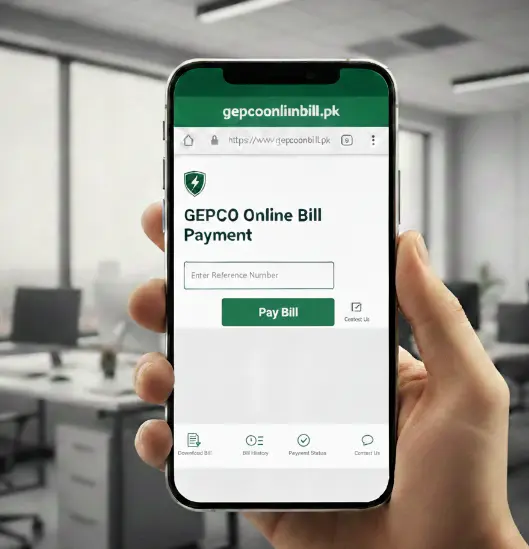
GEPCO Bill Payment Methods
We can easily classify all bill payment methods into two groups:
Here, we will discuss these methods in detail so you can choose the option that best suits you.
Traditional Methods
These are old methods, but they still work well, and most people use them because they consider them more reliable. In this, we can include all commercial banks and the Pakistan Post Office.
Commercial Banks
You can pay your GEPCO bill at any branch of any commercial bank. For bill payment through bank branches, you need to visit the bank branch and submit your bill with all the dues. The cashier will receive your bill and payment, then emboss a stamp on the bill to confirm payment. He will return a portion of the bill with a payment-received stamp as proof of payment. You can save it as proof of payment. It is a physical proof of bill payment.
Post Offices
The Pakistan Post is authorised to receive bill payments, and you can visit any nearest branch for bill payment. They follow the same procedure as bank branches. After receiving the payment, they will affix a stamp to the bill payment and return your bill receipt. You will save it as proof of bill payment. It can be produced when enquiring about bill payment.
Modern or Online Bill Payment Methods
We live in an era of rapid technological change. GEPCO is committed to improving its customers’ experience and has introduced modern bill payment methods to make payments easier. Consumers can now pay their bills online without visiting a bank or post office. Here, we will briefly explain the online bill payment methods.
Bank Mobile Apps
All commercial banks in Pakistan offer mobile apps for online banking. If you are a bank account holder, download the relevant mobile app. Create your account using your credit or debit card, set a password, and PIN. Now, open your app, tap payments, bill payments, then select GEPCO Bill, enter your reference number, and after confirming your bill dues, press the pay bill. The payment will be done, and you will receive a confirmation SMS and a digital receipt. Save it as proof of bill payment.
Some apps may follow a different process, but most bank apps work as described above.
Digital Banking
Most banks offer digital banking. In this, you create an online account using the bank’s website. Search your bank online, open its official website, create an online account, set a password, and confirm your details. Now you can pay your bill online with the help of digital banking. The bill payment process is easy, and you can pay your bill instantly. Open the official site, log in to your account, go to payments, select utility bills, and then select GEPCO as the service provider. Now enter your reference number, and after confirmation, press the “Pay Bill” button. All done!
Through ATM
You can also pay your bill through an ATM if you have a bank card. Go to any ATM, enter your card, select the bill payment option, select GEPCO, and then enter your reference number. You will see your due amount after verification of details pay your bill. You will receive a confirmation SMS, and you can also print a payment slip fromthe ATM. If you use your bank’s ATM, you may not be charged any additional fee. If you use another ATM, a small service fee may apply.
Bill Payment Through Mobile Wallets

Easy Paisa
It is the most widely used mobile wallet, with a large user base. You can easily pay your GEPCO bill using easy paisa app and the manual menu. If you are not using the mobile app, dial *786# and press the send button. Next, follow the instructions, and your bill payment will be done. If you use its mobile app, you can easily pay the bill. Open the app, select bill payment, select GEPC, enter your reference number, and pay your bill after verification.

Jazz Cash
It is also a popular mobile wallet widely used in cities. If you have an account, you can pay your bill easily through the mobile app. Open the app, select bill payment, select GEPCO, enter your reference number, confirm your dues, and press the payment button to submit your bill. You will receive your payment receipt, so save it as proof. You can also use the manual process to pay your bill through Jazz Cash by dialling *786#.
SadaPay App
It is another mobile wallet that lets you pay your GEPCO Bill easily via its app. Open the app, move to payment, and select GEPCO, then enter your reference number. Verify your details and pay the bill by entering your PIN. You will receive a payment confirmation SMS and a payment receipt via the app. Save it for the record and as proof of payment.
NayaPay App
You can securely pay your GEPCO Bill using the NayaPay mobile app. Open the app, navigate to bill payments, select GEPCO, and enter your reference number. You will see the bill details on your mobile screen, including the due date, amount, and name. Confirm these details and press the button to pay your bill. Enter your PIN to complete the process.
Why Choose GEPCO Online Bill Payment Methods?
Most users prefer online bill payment over traditional methods. Here, we list some benefits of using online methods over traditional ones.
Most Convenient
The foremost benefit of adopting online methods is their convenience. You did not need to visit any bank or post office. You did not need to stay in long queues and wait for long hours to pay your bill. You can pay your bill easily by sitting on a couch.
Time Saving
You did not need to spend time in long queues or wait for your turn. Open the app on your mobile device and pay your bill easily. It saves you time and relieves the mental stress of bill payment, unlike traditional methods.
Accessibility
You did not need to visit a branch in person; you can access your app anytime, anywhere, instantly. Just open your mobile app, pay your bill instantly, and avoid hassle or waiting for your turn.
Security
When you pay your bill by any means of digital payment, you will receive a payment receipt instantly. It enhances your payment security by providing a payment receipt. In traditional methods, the cashier may forget to pay your bill, but here you receive a payment receipt instantly.
Tips for Safe Online Payments
While using online payment methods, you should take some precautionary measures to counter any fraudulent activity. We are sharing common safety tips for using digital bill payment methods.
Use a Secure Internet Connection
The foremost security tip is to use a secure internet connection. You should use a trusted Wi-Fi connection or your mobile data to complete online transactions. Because general or public Wi-Fi may contain malware or viruses, hackers can use it to compromise your account or mobile device.
Download Apps from Official Sites
If you want to download a bank’s mobile app, you should use the download link from the official site. Or visit the Google Play Store or App Store and search for official apps. Don’t download any app other than the official one. Hackers use apps to hack your data.
Save Your Payment Receipts
You should save your payment receipt until the next bill is received. If it includes any arrears, please contact the relevant company to arrange settlement. This payment receipt serves as proof of payment, and the company will acknowledge it.
Check Bank Statements
Regularly review your bank statements. It will help you manage your account, and you can decline any payment you did not authorize. Match your transactions with your bill payment carefully.
Turn Off Auto Bill Payment
Sometimes apps request auto-bill payment permissions. Never turn them on, as they will pay the bill instantly online when it becomes available to them, without your permission. You should pay your bill manually after verifying the payment amount.
Frequently Asked Questions (FAQs)
Final Thoughts
GEPCO offers a wide range of bill payment options, from traditional to digital and online. It is upto you which method you adopt. You may choose a payment method at your convenience. If you are a tech-savvy user, you should adopt digital and online bill payment methods. These will provide relief and help you avoid wasting time in long queues at bank branches for bill payments.